 RecordbookHQ
Features
Everything you need to co-sell,
on every plan
Recordbook keeps one shared record for every deal you run with a partner. Your team, your partner's team and both your AIs work from it. Every feature below is on the Free plan and on Pro.
See it in action
Real screens from Recordbook, one page per feature.
-
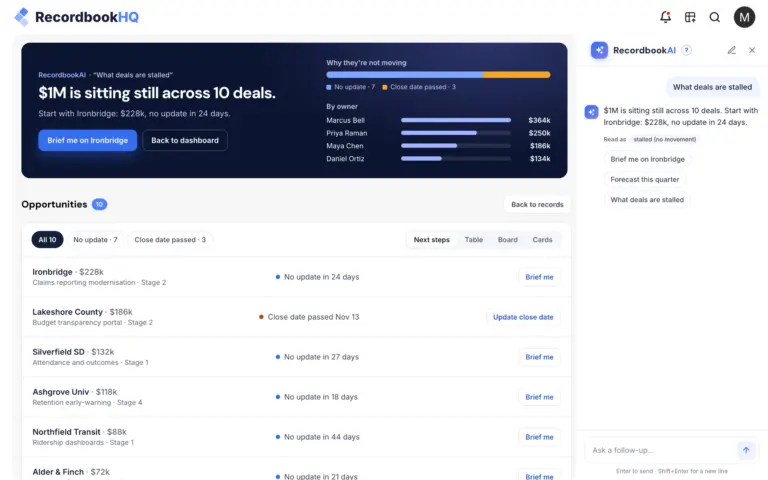 RecordbookAI
Ask in plain English and get the answer first: stalled deals, forecasts, briefings and leaderboards.
-
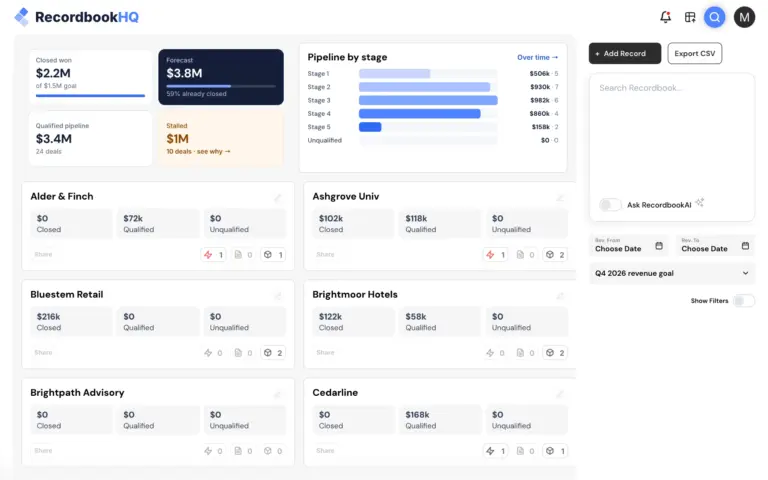
 Pipeline dashboard
Four numbers that tell the story, pipeline by stage, and four ways to work your deals.
-
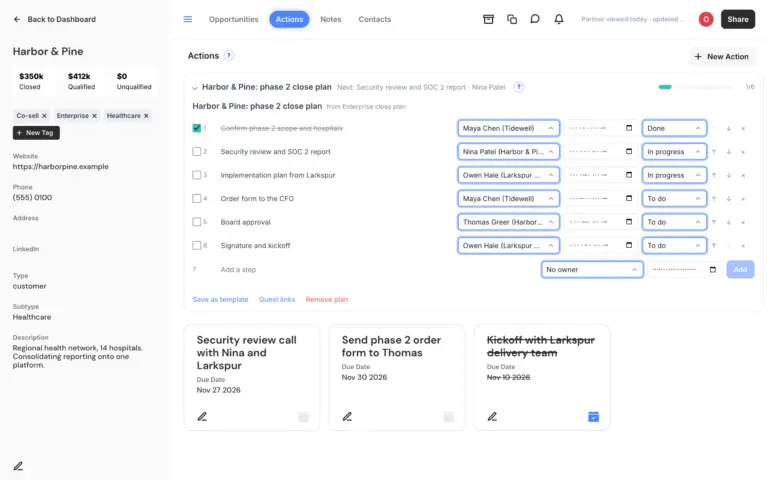
Shared records and action plans
One record both teams work from, with who's who, a mutual close plan and guest links.
-
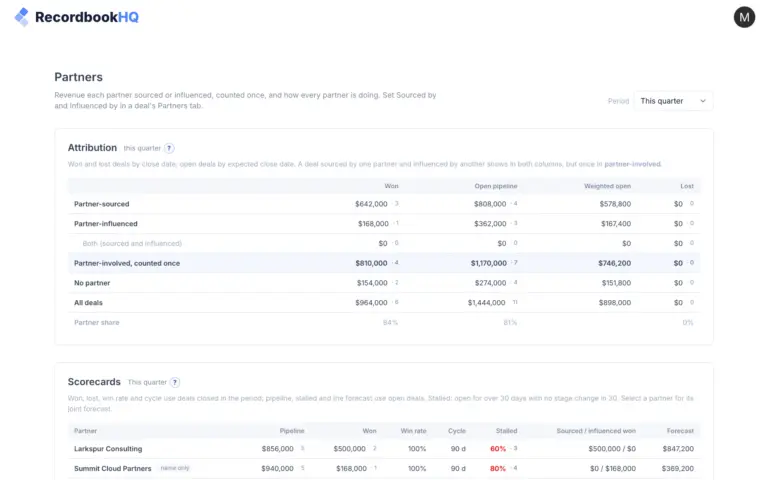
Partner attribution and scorecards
Sourced and influenced revenue counted once, and a scorecard for every partner.
-
Deal registration and referrals
Registrations with a conflict check and 90-day protection, plus referral links for partner reps.
-
Account mapping
Upload a partner's list and see shared customers, prospects and intros to ask for.
-
Claude, ChatGPT and Gemini
Connect your own AI assistant through MCP. It asks before it changes anything.
-
Integrations, alerts and security
Two-way CRM sync, calendar and Google, morning digests, two-factor and an audit log.
Your AI assistant
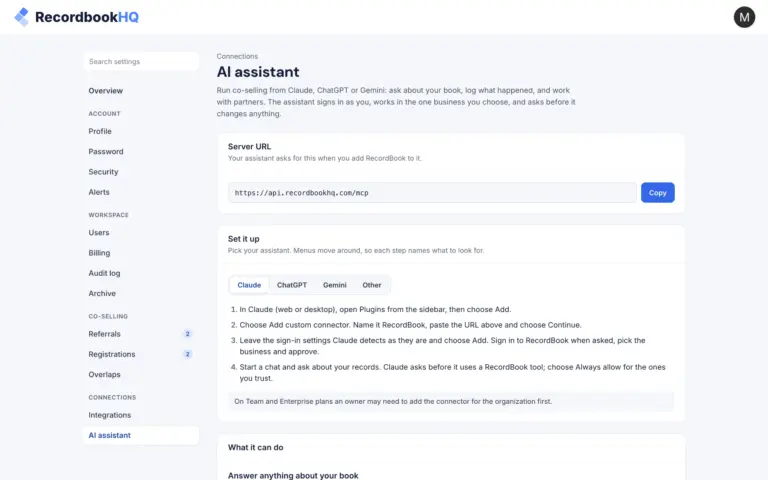
Connect Recordbook to Claude, ChatGPT or Gemini through MCP, the open standard for AI apps. Ask about your pipeline in plain English, tell it what happened instead of filling in fields, and work with partners without opening the app. Every tool follows your permissions.
- “What needs attention today?” lists overdue actions, deals past their close date, deals that went quiet and what’s due this week.
- Say “Met Acme, moving to proposal, follow up Friday” and it proposes the stage change, a note and the follow-up. Nothing is saved until you confirm.
- Ask for forecasts, stalled deals, account briefings and partner updates.
- Add records, deals and contacts, share records with partners, decide registrations and referrals, and build close plans from a conversation. Sharing, archiving and decisions ask twice. See all 44 tools.
- You choose whether your assistant may make changes, and you can disconnect it any time.
Guide: RecordbookAI Connect Claude Connect ChatGPT Connect Gemini
Partner attribution
Every deal names the partner that sourced it and the partner that influenced it, whether or not they use Recordbook, and the reps credited on both sides.
- Set when the deal is created, then locked.
- Only an admin can change it, and every change shows in the activity feed.
- One de-duplicated attribution report, so no deal is counted twice.
Partner scorecards
A Partners page with a scorecard for each partner: what they sourced and influenced, what closed and what’s still open.
- A joint forecast for the pipeline you share.
- Ask “How is Northwind doing?” in the search bar or from your AI.
Deal registration
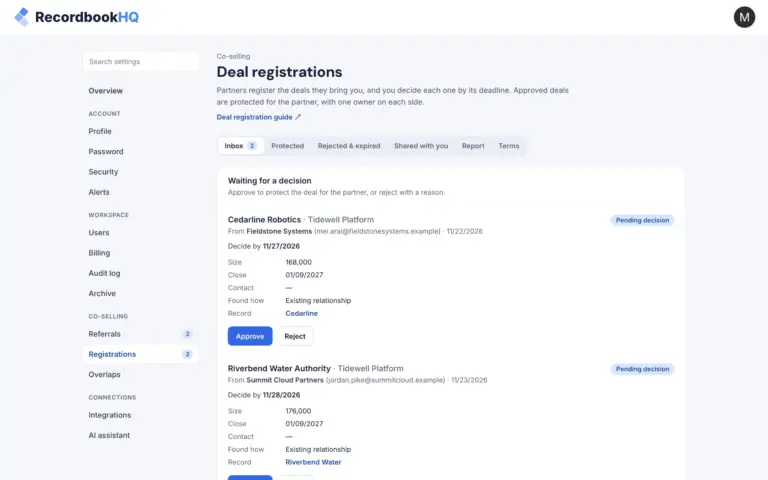
Partners register deals right on the shared record, and you decide with the facts in front of you.
- A conflict check flags the same company registered before, open deals and existing customers. It never rejects anything on its own.
- Approve, or reject with a reason. Approval protects the deal for 90 days and names an owner on each side.
- One extension of 30 to 60 days, approved by an admin.
- Reminders 14 and 3 days before protection ends, and a decision deadline so partners aren’t left waiting.
Referrals
Give each partner a link to a short referral form. Their reps need no login, and bots are kept out.
- Referred leads land in a Referrals inbox, and your admins get an email.
- Accept one and it becomes a record, with the lead as a contact and the partner credited as the source.
- Decline with a reason, and the partner is told.
- Turn a partner’s link off any time.
Account mapping
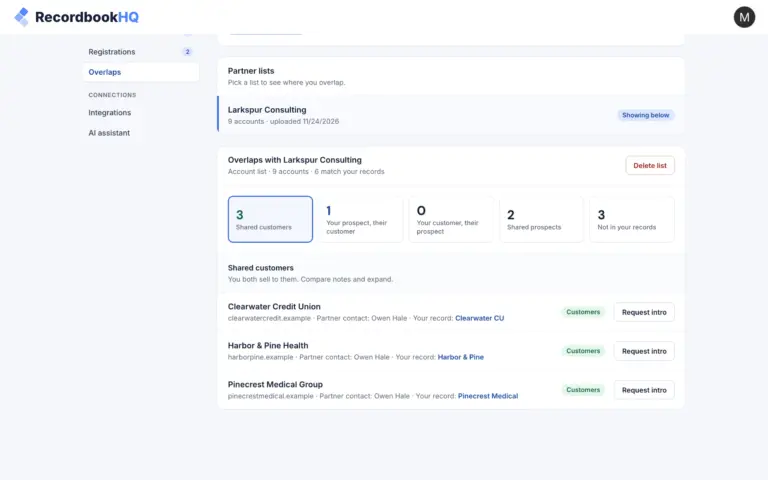
Find the accounts you and a partner have in common. Upload a CSV or a Crossbeam export, and Recordbook matches it to your records by website, then by name.
- See the four overlaps: customers you share, prospects you share, and accounts where one of you is already the customer.
- Turn an overlap into a record in one click.
- Ask for a double opt-in intro: one email goes to both sides, only after the partner’s contact agrees.
- The uploaded file is deleted as soon as it’s read.
Internal notes
Most notes on a shared deal are for everyone on it. Some aren’t. Mark a note Internal and only your team sees it.
- Every note says who can see it: Internal, Shared or From a partner.
- Partners never see Internal notes, and neither does their AI.
- Forwarded emails and AI-drafted emails start as Internal.
Email-in
Every record has its own email address. Forward or BCC an email to it and it’s filed as a note on the deal.
- Only people on the record can send to it, and each sender is checked.
- Partners on the deal can use it too.
- Change the address any time.
Integrations
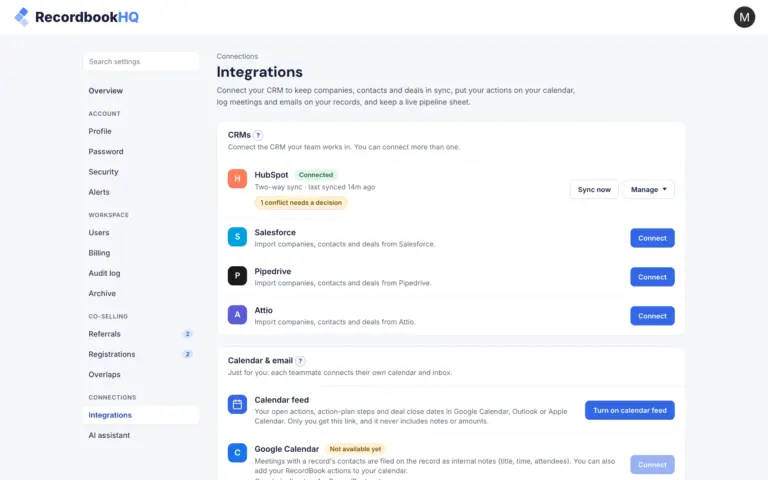
Recordbook works alongside your CRM, not instead of it. Connect HubSpot, Salesforce, Pipedrive or Attio and the two stay in step, both ways.
- Imports your companies, deals and contacts, and sends deal stage, amount, close date and new notes back.
- When a field changed on both sides, nothing is overwritten until you pick which one wins.
- Map each HubSpot pipeline’s stages to yours.
- Every sync shows what came in, what went out and anything that didn’t, with the reason.
- Each person can add their actions and close dates to any calendar with a private feed, file meetings from Google Calendar on the right records, and keep a live pipeline sheet in Google Sheets. Gmail logging follows once Google finishes its security review.
Alerts
Recordbook tells you what needs doing, so nothing waits on someone remembering.
- A morning email with overdue actions, what’s due today, stalled deals and partners who’ve gone quiet.
- A weekly digest for the whole team every Monday.
- Partners get their own morning email for the deals you share.
- Shared deals show “needs a nudge” when a partner hasn’t looked in a week.
Security
Sharing is per deal, so partners only ever see the records you share with them.
- Two-factor sign-in with an authenticator app, and recovery codes.
- Sign in with Google.
- An audit log for admins: sign-ins, role changes, exports, connections and more, with CSV export.
- A new sign-in email only takes effect once it’s confirmed.
Every plan
Every feature on this page is on every plan. Free covers up to 25 active records. Pro is $99 a month for unlimited records, with a 30-day free trial. Add as many people as you like, and partners you invite join free.
Run your next co-sell deal
from one shared record
Free for up to 25 active records, with every feature. Pro is $99 a month for unlimited records, with a 30-day free trial.
Try free