 RecordbookHQ
how-to guide
Action Plans: Mutual Close Plans and Guest Links
Build a close plan on a deal with steps owned by your team, your partner and the customer, and send the customer a guest link.
- Where
- A record’s Actions tab › Action plan
- Who
- Your team and partners on the record; guests by link
- Time
- 5 minutes per deal
- Plan
- Every plan
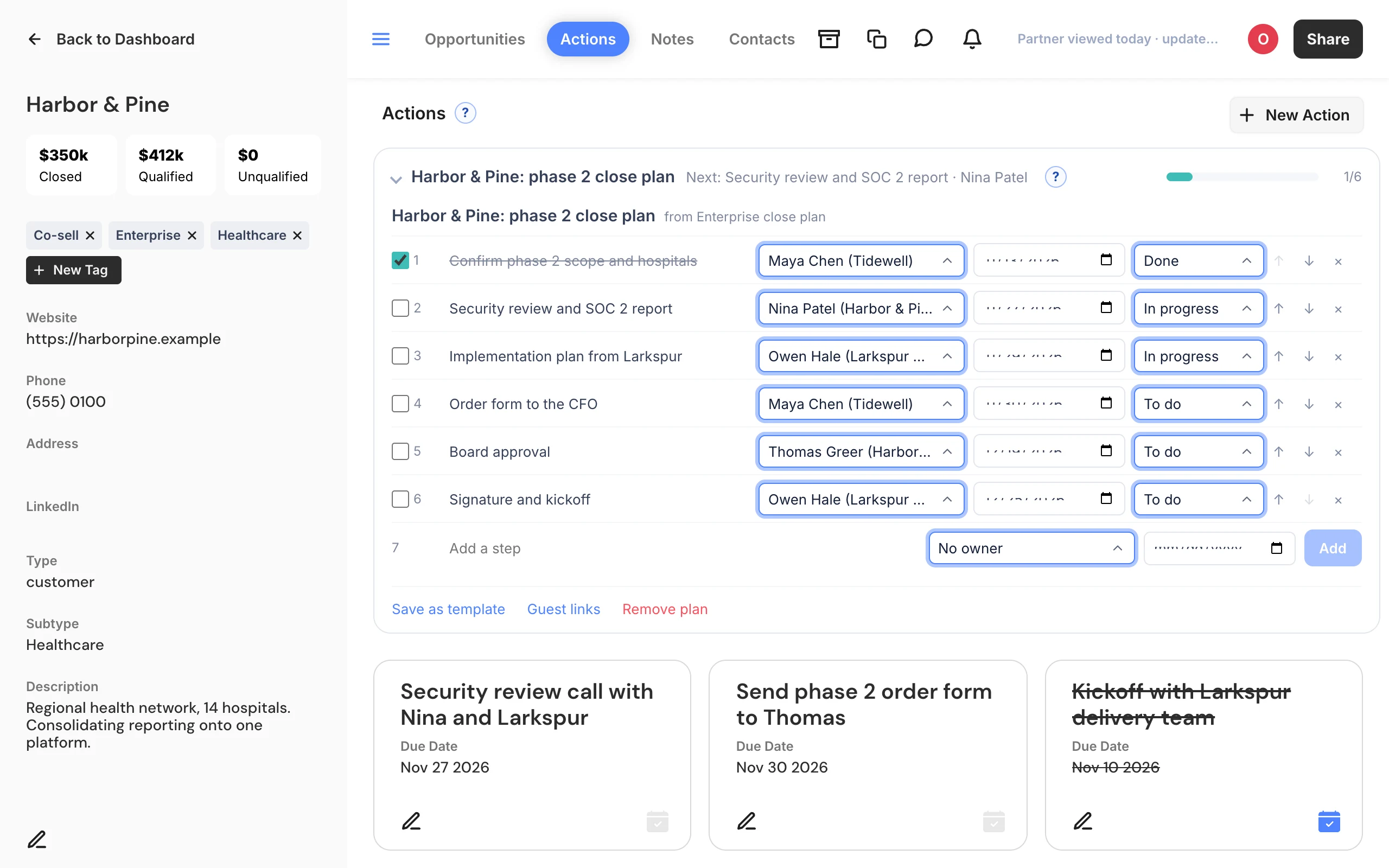
An action plan is the list of steps to close a deal, with an owner and a date on each: someone on your team, someone at your partner, or someone at the customer. Your partner sees and edits the same plan on the shared record. The customer can follow along through a guest link, without an account, and tick off their own steps.
Start a plan
-
Open the record’s Actions tab
The Action plan bar sits at the top. Click it to open it. With no plan yet, it says Optional. Who does what next, across both teams.
-
Choose where to start
Under Start from, pick Blank plan or one of your templates, then click Start a plan.
-
Add the steps
Type each step in Add a step and click Add. Then, for each step, set:
- Owner: someone from your Team, your Partners, or the record’s Contacts.
- Due date.
- Status: To do, In progress or Done.
Reorder with the up and down arrows. A plan holds up to 50 steps.
Share it with your partner
Nothing extra to do. When the record is shared with a partner, they see the plan at the top of the shared record, already open. They can add and edit steps and tick them off, just like your team. Steps they finish show who did them.
Send the customer a guest link
-
Add the customer as a contact
Guest links go to contacts on the record that have an email address. Add one on the Contacts tab if needed.
-
Click Guest links under the plan
Pick the contact from Choose a contact… and click Send guest link. They get an email with their link.
-
They follow along
The link opens the plan with progress (3 of 7 done). They can tick off the steps they own, and nothing else. They can’t see your notes, deals or anything outside the plan.
Keep it moving
- Turn on your calendar feed and the plan steps you own show up in your calendar on their due dates.
- Shared with me shows each shared record’s plan progress, so partners see where every deal stands.
Ask your AI
“Build a close plan for the Acme deal: security review, pricing, legal and signature, with owners on our side, Northwind’s and Acme’s.”
“What’s overdue on my action plans?”
“Send Dana at Acme a guest link to the plan.”
Emailing a guest link is proposed first, then sent only after your second yes.